
Cloud or On-Premise ERP? An Honest Answer
Cloud or on-premise ERP? Get an honest, easy comparison of cost, security, control, and scalability to choose the right ERP for your business.
Cloud vs On-Premise ERP: Which Is Right for Your Business? | Gluon ERP
If you're shopping for ERP software, you've probably hit this question early: should we go with cloud ERP or on-premise ERP?
Every vendor has an opinion, and most opinions conveniently favor what they sell. So here's a plain-English answer, with no pressure and no jargon.
The short answer: neither is "better" in every case. The right choice depends on your business size, budget, IT team, industry rules, and growth plans. Let's break it down.
What Is Cloud ERP?
Cloud ERP is ERP software hosted on remote servers and accessed through the internet. You log in through a browser or app, much like online banking or email. The provider manages the servers, updates, backups, and security.
You usually pay a monthly or yearly subscription instead of a large upfront fee.
What Is On-Premise ERP?
On-premise ERP is installed on servers inside your own office or data center. You own the infrastructure and your IT team maintains it, handling updates, backups, security, and hardware.
You typically pay a one-time license fee plus ongoing maintenance costs.
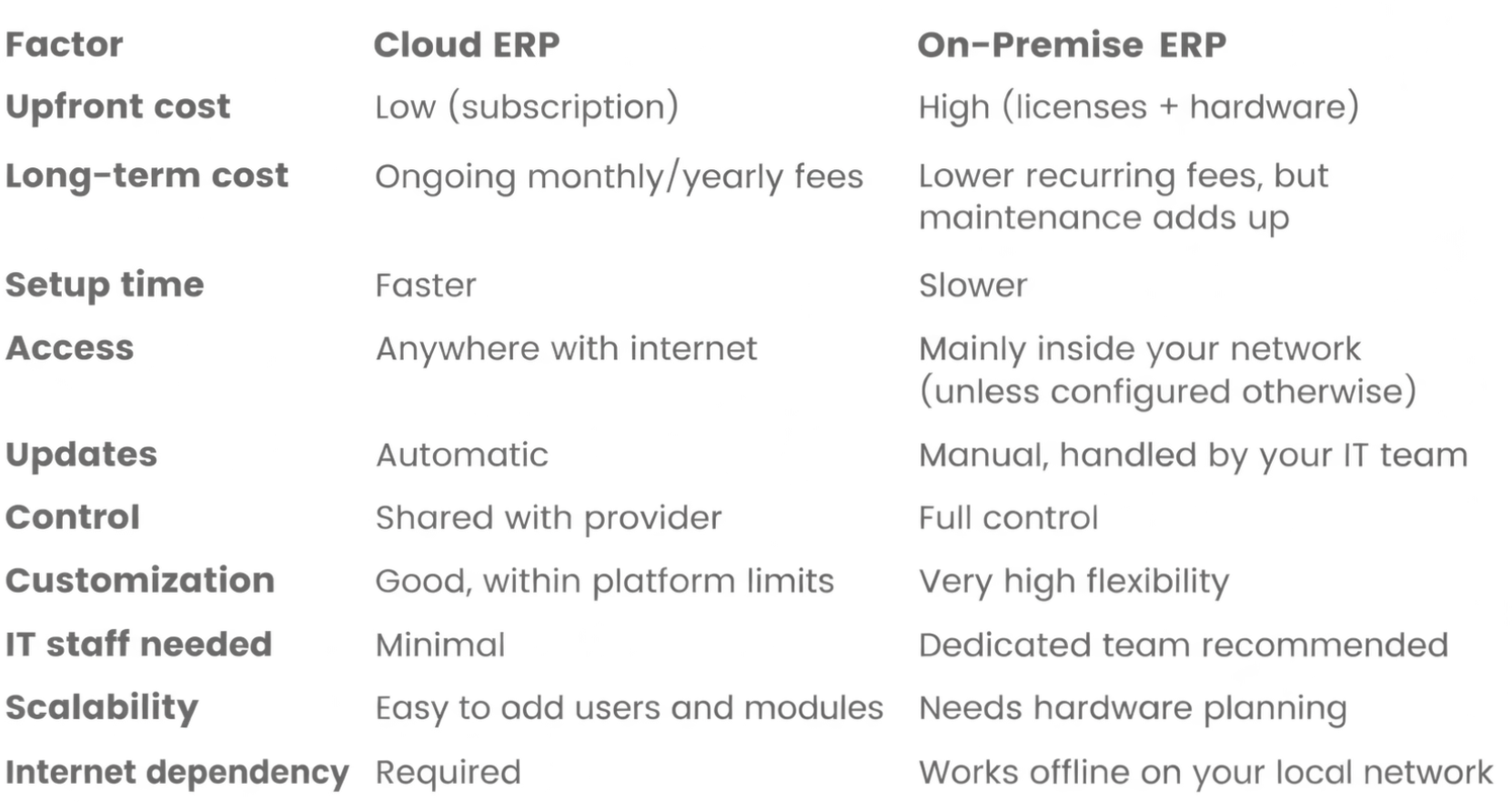
Cloud vs On-Premise ERP: Side-by-Side Comparison
The Honest Pros and Cons
Cloud ERP
Pros
- Lower startup cost. No servers to buy, so it's great for small and medium businesses (SMBs).
- Quick implementation. You can be up and running faster.
- Work from anywhere. Teams, branches, and remote staff can access real-time data from any device.
- Automatic updates. New features and security patches arrive without downtime projects.
- Easy scaling. Add users, warehouses, or modules as you grow.
- Built-in backups and disaster recovery.
Cons
- I need a reliable internet connection. If your internet is unstable, work slows down.
- Subscription costs continue for as long as you use it.
- Less control over server environment and update timing.
- Data sits with a third party, so you need to trust your provider's security practices.
On-Premise ERP
Pros
- Full control over your data, servers, and security setup.
- Deep customization to fit unique business processes.
- Works without the internet on your local network.
- Helpful for strict compliance needs, such as industries with data residency requirements.
Cons
- High upfront investment in hardware, licenses, and setup.
- You manage everything: backups, updates, security, and downtime.
- Needs skilled IT staff, which adds cost.
- Harder to scale. Growth means buying more hardware.
- Remote access takes extra effort (VPNs, security configuration).
Which One Is Right for You?
Ask yourself these questions.
1. What's our budget right now?
If you want to avoid large upfront costs, cloud ERP is usually easier to start with.
2. Do we have an in-house IT team?
No IT team? Cloud ERP takes the burden off you. A strong IT department? On-premise becomes more realistic.
3. How many locations or remote users do we have?
Multiple branches, field staff, or remote teams benefit hugely from cloud access.
4. How fast are we growing?
Fast-growing businesses often prefer the flexibility of cloud ERP.
5. Do regulations restrict where our data can be stored?
Some industries need data kept on-site or in specific regions. Check your compliance requirements first.
6. How reliable is our internet?
If connectivity is poor, an on-premise setup (or a hybrid approach) may be safer.
What About Hybrid ERP?
You don't always have to pick one. Hybrid ERP combines both: for example, keeping sensitive data or core operations on-premise while using cloud tools for reporting, mobile access, or branch offices. It's a practical middle path for businesses that want flexibility without giving up control.
Common Myths, Busted
"Cloud ERP isn't secure."
Reputable cloud providers invest heavily in encryption, access controls, and monitoring, often beyond what a small business can afford on its own. Security depends on the provider and on how well your setup is managed, not just where the data lives.
"On-premise is cheaper in the long run."
Sometimes, but not always. Hardware refreshes, IT salaries, power, backups, and upgrades add up. Compare the total cost of ownership (TCO) over 5 to 7 years, not just the sticker price.
"Cloud ERP can't be customized."
Modern cloud ERP systems offer plenty of configuration options, custom fields, workflows, and integrations.
A Simple Rule of Thumb
- Choose cloud ERP if you want a fast start, lower upfront cost, easy scaling, and anywhere-access.
- Choose on-premise ERP if you need maximum control, have strict data requirements, and have the IT resources to manage it.
- Consider hybrid ERP if you need a bit of both.
There's no one-size-fits-all answer, and any vendor who claims otherwise isn't being honest with you. The best ERP deployment is the one that matches your business: your budget, your team, your goals, and your growth plans.
At Gluon ERP, we'd rather help you make the right decision than the quickest sale. Whether you're leaning toward cloud, on-premise, or something in between, our team can walk you through the options and help you choose with confidence.
Ready to find the right ERP setup for your business?
One platform.
Every part of your business.
Request Your Free
Gluon ERP Demo



and ERP insights delivered to your inbox.


